Coverage Collection
Otto collects gcov coverage data from remote hosts and renders
multi-tier HTML coverage reports. Coverage tiers — system (e2e),
unit, manual, or any other name — are declared in
.otto/settings.toml; three commands drive the workflow:
otto cov get(also run implicitly byotto test --cov) — fetches.gcdacounters from the lab and writes acapture.jsonper board, anchored tobase_commit.otto cov clean— zeroes remote.gcdacounters ahead of a fresh collection session.otto cov report— assembles every tier’s data (e2e captures, harvested unit counters, the committed manual store) into an HTML report.
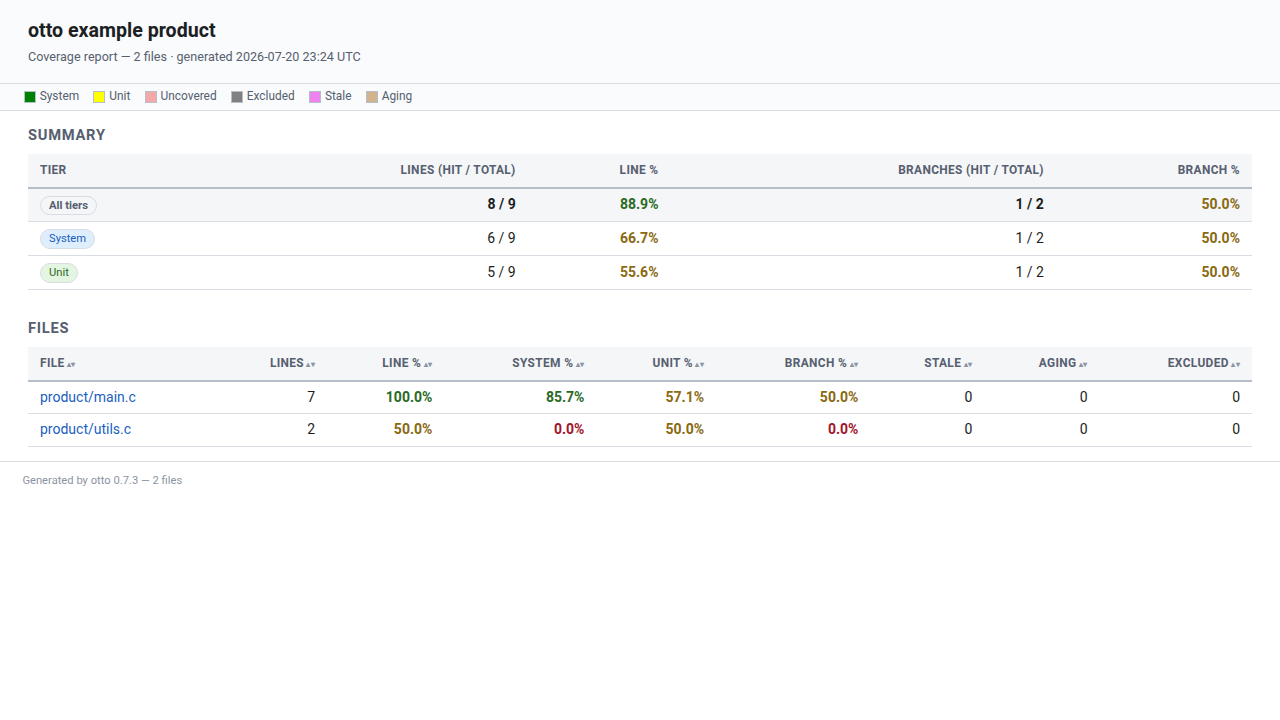
The screenshot is generated from the live report renderer at docs build
time by scripts/capture_docs_media.py — the same pipeline that captures
the monitor dashboard — so it can never drift from what otto cov report
actually produces.
See Coverage — the collection pipeline for how the fetch → merge → capture → render pipeline fits together, and for the design behind tiers, validity, and why only manual captures are committed.
otto cov --help
Setting up your product
The collection workflow on this page is the same for every product; what differs is how the product itself is built and instrumented. Each build type has its own setup page:
Prerequisites
The following system packages must be installed on the otto host
(the machine running otto test and otto cov):
Package |
Purpose |
Required |
|---|---|---|
|
Capture and merge |
Yes |
|
Process |
Yes |
On remote hosts (the machines running the instrumented product):
The product must be compiled with
gcc --coverageorclang --coverage(both spell-fprofile-arcs -ftest-coverage)..gcdafiles must be written to a known directory.
For clang-built products the otto host additionally needs llvm-cov
(the llvm package) — see Clang Products.
Install on Debian/Ubuntu:
sudo apt-get install lcov
Install on RHEL/CentOS:
sudo yum install lcov
gcov is included with GCC. Ensure the gcov version matches the GCC
version used to compile the product.
Configuration
Add a [coverage] section to your repo’s .otto/settings.toml:
[coverage]
# Required: where .gcda files live on remote hosts
gcda_remote_dir = "/var/coverage/myproduct"
This is the only required configuration. The source root is
auto-detected by walking up from the current directory to find the
.otto/ directory. Path mappings between build-host paths and local
source paths are auto-discovered from the .info and .gcno files.
An optional hosts regex scopes collection to a subset of the lab
(matched against each host id) — this is how an SSH hop that fronts a
coverage target is kept out of the coverage set without otto having to
guess which hosts emit .gcda:
[coverage]
gcda_remote_dir = "/var/coverage/myproduct"
hosts = "^device.*"
Declarative Tiers
A tier is a named layer of coverage data. Tiers are declared under
[coverage.tiers.<name>] in .otto/settings.toml — no more ad-hoc
--tier NAME=PATH flags for data otto can collect itself:
[coverage.tiers.system]
kind = "e2e"                 # collected by `otto test --cov` / `otto cov get`
precedence = 1                # lower number = wins winner-take-all coloring
color = "green"                # CSS color name or "#RRGGBB"; per-kind default if omitted

[coverage.tiers.unit]
kind = "unit"
precedence = 2
harvest_dirs = ["build"]     # swept for .gcda at report time; "${sut_dir}" expands
color = "yellow"

[coverage.tiers.manual]
kind = "manual"
precedence = 3
max_age = "180d"             # optional; flag-only aging
color = "orange"

[coverage.exclusions]
markers = ["MYPROJ_NO_COV"]  # optional additions to the LCOV_EXCL_* set
Each [coverage.tiers.<name>] block:
Field |
Meaning |
|---|---|
|
One of |
|
Integer; lower wins the winner-take-all row coloring when multiple tiers cover the same line. |
|
Optional CSS named color or |
|
|
|
|
Tier names are free-form and multiple tiers may share a kind —
for example two manual tiers, manual_qa and manual_dev, both
kind = "manual", distinguished by name, precedence, and color.
Backward compatibility: a settings file with no [coverage.tiers]
section behaves exactly as before — an implicit system tier
(kind = "e2e", precedence 1) is assumed.
Per-Host Toolchain
Each host can specify its own toolchain (gcov, lcov) for
coverage processing. This is configured via the toolchain field in
lab.json — see the host guide for
the full syntax.
When no explicit toolchain is configured, otto resolves tools in this order:
Explicit config —
toolchainobject inlab.json.Auto-discovery — otto reads the gcov version stamp from the build’s
.gcnoheaders (a.gcnoembeds no compiler path, but every compiler stamps the format version it wrote). A clang stamp resolves tollvm-covfromPATH; a GCC stamp means the defaultgcovalready applies — a cross-GCC toolchain cannot be located from the.gcnoalone and must be configured on the host.System default —
/usr/bin/gcovand/usr/bin/lcov.
When the resolved tool cannot actually read the build’s counters —
classically a clang build captured with GNU gcov — the capture
stops with a typed error naming both versions and the fix, instead of
producing an empty or wrong report.
Clang Builds
Clang-compiled products emit counters in a format GNU gcov cannot
read; otto routes them through llvm-cov instead — setup and caveats
on the Clang Products page.
Retrieving Coverage: otto cov get
otto cov get is the single retrieval command. It fetches .gcda
counters from every host matched by [coverage].hosts — Unix hosts
over the network, embedded boards over the console — parses them with
the discovered toolchain, and writes one capture.json per board
(anchored to base_commit) plus debug artifacts (the raw .gcda and the toolchain’s
.gcov/.info intermediates) into the command’s output directory:
<output>/
  cov/
    <board_id>/
      capture.json
      *.gcda
      board.info
      board.resolved.info
By default otto cov get targets the lab’s sole e2e-kind tier and
writes a capture that is not committed anywhere — it lives in the
output directory, the same as a run’s other artifacts. Selecting a
manual-kind tier switches the command into manual-capture mode: it
requires --ticket, annotates tester identity onto the capture, and
additionally copies the capture into the repo’s committed store at
.otto/coverage/manual/:
# Default: retrieve against the sole e2e-kind tier.
otto cov get

# Manual session: anchor a capture, attach a ticket, commit it.
otto cov get --tier manual --ticket PROJ-123 --note "verified failover via GDB"
Options
Option |
Description |
Default |
|---|---|---|
|
Directory to write fetched coverage and per-board captures into |
the command’s standard per-invocation output directory |
|
Coverage tier to annotate onto each capture |
the lab’s sole |
|
Ticket reference annotated onto each capture. Required when |
none |
|
Free-text note annotated onto each capture ( |
none |
|
Tester name annotated onto each capture ( |
|
|
Tester email annotated onto each capture ( |
|
|
Zero the fetched Unix hosts’ remote |
off |
--ticket, --note, --tester-name, and --tester-email are only
meaningful for a manual-kind retrieval; passing them against an
e2e-kind tier has no effect (an automated pull has no human tester to
attribute).
Retrieval requires a git repository — resolving base_commit and, for
a dirty tree, the offset remap both need it. Outside a git repo,
otto cov get refuses with a clean error; otto cov report’s
--tier NAME=PATH escape hatch remains available for git-less flows
(see The --tier NAME=PATH escape hatch). The SUT directory does not have
to be the repository root: a SUT checked out as a subdirectory of a
larger repository (a monorepo layout) anchors its captures against the
enclosing repo — its HEAD is the base_commit, and its working-tree
state decides dirtiness.
Locally-modified builds
Manual testing frequently happens against a locally modified
build — printf-and-recompile, a GDB session poking at a running
binary. These sessions still run instrumented code, so real counters
exist, but their line numbers describe the modified tree, not the
committed one. otto cov get detects a dirty working tree
(git status --porcelain non-empty) automatically and remaps the
retrieved hits onto committed-code line numbers before writing the
capture — added/changed lines’ hits are dropped (crediting untested
code would be wrong), unchanged lines remap exactly even when they’ve
shifted. The capture records dirty_remap: true, which shows up in
the report’s run table (see Runs: which run covered this line?); no diff is
stored.
The capture file
Each board’s capture.json records line/branch hits in
committed-code coordinates, the commit they’re anchored to, and — for
a manual capture — the human metadata:
{
  "schema": 2,
  "tier": "manual",
  "base_commit": "<commit sha>",
  "dirty_remap": true,
  "captured_at": "2026-07-02T18:40:00Z",
  "tester": {"name": "chris", "email": "chriscoll93@gmail.com"},
  "ticket": "PROJ-123",
  "note": "verified failover via GDB",
  "labs": ["lab1"],
  "board": "mps2_an385",
  "files": {
    "src/foo.c": {
      "blob": "<git blob sha of src/foo.c at base_commit>",
      "lines": {"12": 3, "13": 1},
      "branches": {"12": [[0, 0, 2], [0, 1, 0]]}
    }
  }
}
base_commit is the commit whose coordinates the line numbers mean;
each file’s blob is the git blob SHA of that file at base_commit
— the rebase-tolerant anchor Staleness and aging checks against.
An e2e-kind capture has the same shape but omits tester/ticket/
note; at report time its base_commit acts as a strict guard — it
must equal the tree’s current HEAD — and a dirty working tree only
triggers a line-number remap onto the current tree, never the manual
tier’s validity pass (see Stale Builds: “stamp mismatch” and the e2e base_commit guard).
Collecting Coverage During a Test Run: otto test --cov
otto test --cov TestMyDevice
This runs the test suite normally, fetches .gcda files from every
matched host, and — on a best-effort basis — produces a capture.json
per board, anchored to base_commit, against the lab’s default e2e-kind tier
using the same capture-production machinery as otto cov get. This
tail never fails an otherwise-successful test run: a non-git SUT,
misconfigured tiers, or a stamp mismatch during merge are logged and
swallowed, leaving the raw .gcda artifacts on disk for manual
recovery via otto cov get. The files land in a cov/ directory in
the suite’s output directory, organized by board:
<log_dir>/
  cov/
    <board_id_1>/
      capture.json
      *.gcda
    <board_id_2>/
      capture.json
      *.gcda
Note
Both otto cov get and this otto test --cov tail wrap one async library
function — collect_coverage() — paired with run_coverage_report() for the
HTML report. To drive collection and reporting from your own Python (CI glue or
a custom pipeline), see the Collecting coverage from Python section of
Python library.
Choosing a Destination
Use --cov-dir to write coverage artifacts to an explicit location —
for example, a persistent CI directory:
otto test --cov-dir /var/artifacts/myrun TestMyDevice
--cov-dir implies --cov, so the --cov flag is optional when you
supply a path. The destination directory is created if it does not
already exist. If it exists and is non-empty, the run aborts to avoid
mixing stale coverage into the new results; pass --overwrite-cov-dir
to clear it first:
otto test --cov-dir /var/artifacts/myrun --overwrite-cov-dir TestMyDevice
Omitting both --cov and --cov-dir disables coverage collection.
Inline Reports
--cov-report renders the HTML report immediately after the run,
without a separate otto cov report invocation. It goes through the
same collection model: the configured tiers (colors, precedence,
custom exclusion markers), the unit-tier harvest, and the committed
manual store all apply, exactly as they would in a standalone report.
Like the capture tail, inline report generation is best-effort — a
report-side problem is logged and never fails an otherwise-successful
test run.
Pre-Run Cleanup
By default, --cov deletes stale .gcda files on remote hosts
before the test run. This is important because .gcda counters are
additive — without cleanup, coverage data from previous runs
contaminates the current results.
To skip pre-run cleanup and accumulate coverage across runs:
otto test --cov --no-cov-clean TestMyDevice
Cleaning Counters: otto cov clean
otto cov clean zeroes .gcda counters on the lab’s coverage hosts
without fetching anything — useful ahead of a manual session when the
previous capture has already been retrieved:
otto cov clean
It targets the same host selection otto cov get fetches from, but
Unix hosts only. Embedded targets expose no counter-reset hook; when
the lab has any embedded coverage hosts, the command logs a note and
exits 0 rather than failing. A lab with only embedded coverage hosts
is likewise not an error — on embedded hosts it is simply a no-op.
Coverage Tiers
Every tier’s kind selects how otto cov report collects its data:
Kind |
Collected by |
Storage |
|---|---|---|
|
|
|
|
Nothing otto runs for you — build and run your instrumented unit tests as usual; |
no capture file |
|
|
|
Only manual captures are committed to the repo — every capture
(manual or e2e) is anchored to a base_commit. E2E data comes from
the output directories of previous otto runs; unit data is swept fresh
from the build tree every time a report is generated — there is no run
discipline imposed on it.
Three-tier walkthrough
e2e — run the suite with coverage on:
otto test --cov TestMyDevice
unit — build your unit tests with coverage instrumentation and run
them as you always have; .gcda files land next to the .gcno files
under the tier’s configured harvest_dirs (e.g. build/):
cmake -DCMAKE_C_FLAGS="--coverage" -DCMAKE_CXX_FLAGS="--coverage" \
      -DCMAKE_EXE_LINKER_FLAGS="--coverage" -B build ..
cmake --build build --target my_unit_tests
./build/my_unit_tests
No lcov invocation and no --tier unit=... flag are needed — as long
as [coverage.tiers.unit].harvest_dirs points at build, otto cov report finds and merges the counters itself.
manual — retrieve and anchor a session against the instrumented target, attaching a ticket:
otto cov get --tier manual --ticket PROJ-123 --note "verified failover via GDB"
git add .otto/coverage/manual/
git commit -m "cov: manual verification for PROJ-123"
Then generate a single report covering all three:
otto cov report path/to/e2e_run_output/ --report ./cov_report
otto cov report reads the e2e capture(s) from the given output
directory, harvests the unit tier’s harvest_dirs from the current
build tree, and loads every committed manual capture automatically —
no path arguments needed for the unit or manual tiers.
Staleness and aging
Manual captures are anchored evidence — as the repo moves on, otto must decide whether that evidence still applies. A per-file anchor chain (current blob SHA → blob diff → base_commit diff → unverifiable) resolves each capture’s lines to one of these states at report time:
State |
Meaning |
Effect on coverage |
|---|---|---|
valid |
Line unchanged since the capture’s |
Counts normally |
stale |
Code changed since the capture — the evidence no longer describes this line |
Coverage is revoked; rendered as “needs re-verification” |
aging |
Code is unchanged (still valid), but the capture is older than the tier’s |
Coverage is retained (flag-only — |
unverifiable |
Neither the blob nor |
Treated as stale, with a loud per-capture warning naming the remedy (re-capture) |
Stale vs. aging, precisely: stale = the code changed out from under the evidence; aging = the code is unchanged but the evidence is old.
The anchor-chain diff is whitespace-insensitive (git diff -w), so a
pure reformat — reindentation, tabs↔spaces, trailing-whitespace strips —
does not stale a manually-covered line: the evidence carries through, and
lines merely shifted by such edits remap to their new numbers. Only a
change to the code itself revokes coverage. (The SUTs are C/C++, where
whitespace is not semantically load-bearing; the single case this also
forgives — a whitespace change inside a string literal — is treated as
immaterial to coverage.)
Runs: which run covered this line?
Every coverage input becomes a run at report time: each manual
or e2e capture is one run (labelled by the host’s display name; hover for
tier, ticket, note, date, and base_commit), and each unit-tier harvest or legacy
.info load gets a synthetic per-tier run. On a file’s annotated page,
the right-hand runs column expands per line to list every run that hit
it, colored by tier, with per-run hit counts. A stale line lists the
revoked run struck through — the ticket to re-verify. The index’s
Captures table is the full run table, and store.json carries it
(runs plus per-line run/stale_run) for downstream consumers.
--ticket and --note on otto cov get annotate captures of every
tier kind (--ticket remains required for manual-kind tiers; tester
attribution stays manual-only).
Validity only applies to the manual tier. E2E captures use a
strict base_commit merge guard instead — see
Stale Builds: “stamp mismatch” and the e2e base_commit guard. Unit tiers carry no validity
states; they’re harvested fresh every report, so there’s nothing to go
stale (a .gcda older than its .gcno only produces a “may be stale”
warning, never a revoke).
Generating Reports: otto cov report
otto cov report <output_dir> --report ./my_report
otto cov report assembles a store from every source available:
E2E captures —
capture.jsonfiles under each given output directory’scov/<board_id>/, subject to the base_commit guard below. Board directories with nocapture.jsonfall back to the legacy.gcda-merge path (back-compat with pre-tier output directories).Unit harvest — every
unit-kind tier’sharvest_dirs, swept fresh from the current build tree.Manual store — every capture committed under the repo’s
.otto/coverage/manual/, loaded automatically with the validity pass applied.
OUTPUT_DIRS is now optional: with none given, the report is built
from the committed manual-capture store (and any configured unit
tiers) alone.
A report whose assembled store ends up empty — no captures, no
harvested counters, no manual store — exits 1 with a one-line error
naming every location that was searched, so a misconfigured CI job
fails loudly instead of publishing a blank report.
Stitching Multiple Runs
To combine coverage from separate test runs into a single report:
otto cov report run1_output/ run2_output/ run3_output/ --report ./combined_report
Options
Option |
Description |
Default |
|---|---|---|
|
|
none — report is built from the manual store alone |
|
Where to place the HTML report |
|
|
Title shown in the report header |
|
|
Git-less escape hatch (see below); repeatable, order = precedence |
the configured tiers (or |
Stale Builds: “stamp mismatch” and the e2e base_commit guard
gcov embeds a build stamp in both the .gcno notes files (written at
compile time) and the .gcda data files (written at run time). Raw
counters are therefore only meaningful against the exact build that
produced them — and the moment they are paired is collection, when
otto cov get (or the otto test --cov tail) merges the fetched
.gcda against the local .gcno graph. If the product was rebuilt
in between, gcov refuses the data (stamp mismatch with notes file)
and otto raises a CoverageDataMismatchError explaining the cause
instead of dumping raw lcov output:
Coverage data does not match the current product build (gcov reports a stamp mismatch between .gcda data and .gcno notes files). The product was likely rebuilt after
otto test --covcollected this data — coverage must be reported against the exact build that produced it. Re-runotto test --covand report on the new output directory.
Once a capture.json exists, the build tree no longer matters: the
capture holds parsed hits, not raw counters, so reporting on a
capture-bearing run directory is immune to rebuilds — recompiling
the product between collection and otto cov report changes nothing.
The same rebuild against a pre-capture run directory (an older otto’s
output, loaded via the legacy .gcda-merge fallback) still re-pairs
raw counters at report time and fails with the error above.
The ship-step variant of this mistake — deploying a binary, then rebuilding the local tree it will be decoded against — can be caught in the build itself, before any test time is spent: see the .gcno stamp guard for GCC products, its embedded flavor, and the clang differences (clang’s stale-deploy failure is silent at the toolchain level, so otto verifies the file pairing structurally at collection instead).
A capture carries its own, git-based guard instead: its recorded
base_commit must equal the tree’s current HEAD. A capture taken at a different
commit — the tree moved on since collection — fails the report with a
clean error naming both commits, rather than silently reporting
numbers for the wrong tree; the recovery is to collect fresh coverage
with otto test --cov (or otto cov get) and report on the new
output. A working tree that is merely dirty at report time (same
HEAD, uncommitted edits) does not fail: the e2e capture’s hits are
remapped from committed-code coordinates onto the current tree — the
report-time mirror of the dirty-tree remap at retrieval — with a warning, and hits on
locally-modified lines are omitted rather than misattributed.
The --tier NAME=PATH escape hatch
--tier NAME=PATH remains available as a git-less fallback for
data the declarative model doesn’t produce — a foreign lcov .info
file, or a report built outside a git repository (retrieval and the
validity pass both require git; this flag does not). When any
--tier flag is given, otto cov report bypasses the declarative
tiers model entirely — settings tiers, the manual store, and unit
harvesting are not consulted; only the exact tiers named on the
command line are loaded.
NAME is a free-form label; PATH is an lcov .info tracefile. The
bare form --tier system (no path) refers to the implicit tier
produced by merging the supplied .gcda directories with lcov; every
other tier requires a path. Flag order is precedence order — the
first flag is highest-precedence and wins the row coloring when
multiple tiers hit the same line.
otto cov report runs/ \
    --tier unit=u.info \
    --tier system \
    --tier integration=i.info \
    --tier manual=m.info \
    --report ./cov_report
This produces a four-tier report with precedence
unit > system > integration > manual. A line hit only by the
manual tier is colored manual; a line hit by all four is colored unit
(the highest-precedence hit wins). The summary table and per-file
table both grow a column per tier in the same left-to-right order.
Exclusion Markers
lcov’s geninfo honors the standard exclusion markers natively —
excluded lines never enter the parsed data, so they never enter a
denominator:
LCOV_EXCL_LINE— exclude one line.LCOV_EXCL_START/LCOV_EXCL_STOP— exclude a block.LCOV_EXCL_BR_LINE,LCOV_EXCL_BR_START/LCOV_EXCL_BR_STOP— branch-only variants (line/block still counted, only its branches excluded).
The HTML renderer additionally re-scans each rendered source file for these markers so excluded lines and blocks are visually distinct (grey, with a per-file excluded count) instead of reading as ordinary uncovered code. In the row-coloring precedence (see Colors and Legend), excluded always wins, even over a covered, stale, or aging line.
Extend the recognized marker set with custom strings via
[coverage.exclusions] markers:
[coverage.exclusions]
markers = ["MYPROJ_NO_COV"]
Custom markers are render-only today: a line marked
// MYPROJ_NO_COV is scanned by the renderer alongside the built-in
LCOV_EXCL_* set, so it renders grey and excluded like any other
excluded line — but unlike the built-in markers (which lcov’s
geninfo strips from the parsed data before it ever reaches otto),
a custom marker is not passed to the lcov capture as an rc
override. The line still counts toward the coverage percentages;
only its visual presentation changes.
Colors and Legend
Each tier renders in its configured color — a CSS named color or
#RRGGBB hex, validated when settings load (an invalid value is a
settings error, not a report-time surprise). A tier that declares no
explicit color gets a default keyed by its kind:
Kind |
Default color |
|---|---|
|
green |
|
yellow |
|
orange |
Line states — as opposed to tiers — use fixed, non-configurable colors:
State |
Color |
|---|---|
uncovered |
light red |
excluded |
grey |
stale |
violet |
aging |
tan |
Each annotated source line resolves to exactly one color, in this
precedence order: excluded (grey, always wins) → the
highest-precedence tier color among tiers with valid evidence on
that line → aging (tan — the winning evidence is valid manual data
past its max_age, i.e. a faded manual orange) → stale (violet —
the only evidence was manual and the code changed since) →
uncovered (light red).
Because tier names are free-form, multiple tiers can share a kind,
and colors are configurable, the report never relies on convention to
explain itself: a legend mapping every tier name and state to its
color renders on the project index and on every per-file page.
Output
The HTML report is written to the --report directory (default:
./cov_report/index.html). The report shows:
Project summary with aggregate (all-tier) and per-tier breakdowns, plus per-file stale/aging/excluded counts.
Legend mapping tier names and line states to their colors.
Captures table — the full run table (see Runs: which run covered this line?), shown whenever the store has at least one run: every contributing manual and e2e capture (tier, board, labs, date, tester, ticket, note, and whether the dirty-tree remap applied), plus one synthetic row per unit tier harvested.
Sortable file table with one column per configured tier.
Per-file pages with the same summary structure plus annotated source: per-tier hit counts, branch pills (taken/not-taken/ unreachable), winner-take-all row coloring per Colors and Legend, and the per-line runs drilldown from Runs: which run covered this line?.
store.json is written alongside the HTML report with the same data —
validity states, colors, runs, and each file’s excluded lines
included — as the explicit data contract for tooling built on top of
a report (e.g. a future frontend) without touching the pipeline.
Embedded (console) coverage
Embedded RTOS targets (Zephyr) have no filesystem otto can fetch .gcda
files from; coverage rides the serial console instead, via an
instrumented LLEXT extension. Product setup (embedded-gcov, the
modern-GCC patch, the .gcno stamp guard), configuration, and the
cross-toolchain block are covered on the Embedded (LLEXT) Products page.