otto monitor
otto monitor collects CPU, memory, disk, and network metrics from remote
hosts, and serves a web dashboard for reviewing what it collected.
Two commands live under one binary:
otto monitor --live [OPTIONS]— the only hardware-touching path (it runs the reservation gate before touching any host, and needs--labto resolve which hosts to poll). Collects from lab hosts and serves the dashboard against that live collector. Add--db PATHto persist the run as a session; reusing the same--dbpath on a later run appends another session to the same archive rather than overwriting it.otto monitor <SOURCE>— review mode.SOURCEis a.jsonexport or a.dbsession archive; no hosts are touched, no reservation gate runs, and no--labis needed —SOURCEis a self-contained document, so this works for a hand-carried archive on a machine with no lab configured at all. The dashboard auto-loads the document the moment the page opens — no Import click needed — and a multi-session archive gets a session picker.
Bare otto monitor (neither --live nor a source) prints usage and exits 2;
--live together with a source is a mutually exclusive error, also exit 2.
See Web dashboard below for what the dashboard shows and
how it gets loaded either way — including live streaming straight into an
open dashboard tab, watching a running --live session’s charts grow in
real time rather than requiring a reload.
See Monitoring — the observation pipeline for how collection,
sessions, the format:1 producer, and dashboard hydration fit together.
otto monitor --help
Live mode
--live is the explicit opt-in that touches hardware; it is never the
default. By default it polls every real host in the lab:
otto --lab my_lab monitor --live
Docker container hosts are excluded — they aren’t operated on as part of
the host fleet. Embedded targets without an snmp block are also
excluded: the monitored set is Unix hosts (shell metrics) plus any host
that declares snmp (polled over SNMP — see
SNMP monitoring below).
Selecting hosts
Pass a regex to --hosts (matched against host IDs via re.search) to
narrow the live host set:
otto --lab my_lab monitor --live --hosts 'router|switch'
otto --lab my_lab monitor --live --hosts router1
Omit the option to monitor every real host in the lab (Docker containers excluded).
Collection interval
Control how often metrics are collected with --interval (default: 5
seconds, minimum: 1 second):
otto --lab my_lab monitor --live --interval 2.0
The 1-second floor is deliberate: a host needs time to answer every query in
the interval without being taxed by the polling itself. It’s enforced at
every human-facing boundary that names an interval — otto monitor --interval above, otto test --monitor-interval (see Monitoring during a
test run below), and
OttoSuite.start_monitor() (see Monitoring from test
suites below) all reject anything lower.
MetricCollector itself is deliberately exempt — it’s the mechanism, not a
knob a human sets, and otto’s own tests drive it as fast as 0.01s against
fake hosts.
Persisting data — sessions
Add --db to persist the run as a session — this run’s lab snapshot,
chart/tab layout, and every collected point — into a SQLite archive:
otto --lab my_lab monitor --live --db metrics.db
Reusing the same --db path on a later run doesn’t overwrite it: each
--live --db metrics.db invocation appends one more session, so a single
archive can accumulate a whole day’s worth of separately-labeled runs. Tag a
session for later review with --label (short, shown in the dashboard’s
session picker) and --note (free-form, shown as that picker entry’s
tooltip):
otto --lab my_lab monitor --live --db metrics.db \
    --label "fan fix" --note "post-repair burn-in, rack 3"
Review a captured archive later with otto monitor metrics.db — see
Reviewing a capture below.
Running otto on shared/NFS storage
otto is safe to run with its log/artifact root (OTTO_XDIR) on a shared mount
(NFS, CIFS/SMB, sshfs, …):
Monitor database. SQLite’s WAL journaling is not supported over a network filesystem, so when the
--dbpath is on one otto automatically uses theDELETEjournal mode instead (logged at debug level). This is transparent and lossless for monitoring’s write pattern.Multi-machine, one shared database. The “another instance is already writing” guard relies on
flock, whose semantics on network filesystems are same-host only. If several machines may write to the same database file, put that database on local disk (or give each machine its own--dbpath).Logs and artifacts. Per-run log directories are fine on shared storage. Old-log rotation is wall-clock budgeted, so even a very large log tree cannot stall a run — any backlog is pruned across subsequent runs.
Lab data and settings (
lab.json,.otto/settings.toml) are read once per run and are unaffected.
If otto cannot determine the filesystem type, it assumes local disk and keeps its default behaviour.
Reviewing a capture
The positional <SOURCE> argument serves a previously captured run without
touching any hosts — no reservation gate, no collection, and no --lab:
otto monitor metrics.db
otto monitor metrics.json
That last point matters for a hand-carried archive: a teammate who receives
metrics.db can open it with the command above on a machine with no lab
configured anywhere — SOURCE is a self-contained document, and review mode
never resolves, loads, or even looks for a lab.
SOURCE must be a .db session archive written by --live --db, or a
.json export — either downloaded from a running dashboard’s ⋯ →
Export, or written by otto test --monitor (see Monitoring during a
test run below). Anything else is a fast,
clear CLI error — there is no silent partial load:
An unrecognized suffix, or a
.json/.dbthat doesn’t parse as aformat:1document, exits 1 with a message naming what was expected.A path that doesn’t exist exits 2 with a usage banner — the argument is validated before the command body runs, so it fails the same way any other bad invocation does.
Breaking change, no migration. A .db/.json written by an otto build
before sessions existed used a different, unversioned shape and is no
longer readable — otto monitor on one of those fails loud naming the
expected format rather than misrendering silently. There is no converter;
re-capture with the current build. The GET /api/export/json endpoint
changed the same way (it now emits this same format:1 shape), which is a
breaking change for anything that scraped it directly. One narrower
caveat, specific to this feature’s early rollout: a .db archive captured
by a pre-release build of --live --db (before its session metadata
persistence was corrected) replays with no chart specs and a null
interval — it looks like a valid archive but the dashboard renders it as
one ungrouped, unit-less chart per series. That has no migration either;
re-capture.
Editing. A .db session archive opened this way is editable — the
dashboard’s marking controls write mutations straight back into the same
file. A .json export has nowhere to persist a mutation, so it stays
permanently read-only and those controls simply don’t render for it; see
Marking events below.
Web dashboard
In both modes, otto monitor serves a web server: it binds an OS-assigned
free port and logs the dashboard URL at startup (Server running at http://<ip>:<port>, one URL per non-loopback interface).
On load, the dashboard shell asks that same server one question — GET /api/mode — then, regardless of the answer, follows up with GET /api/monitor_sessions and renders the result, exactly as if you’d used
Import yourself: no click needed. Live and review servers hydrate through
that same endpoint and the same format:1 shape — a live monitor
session is simply one whose end is still open, exactly like a crashed
session found on disk — so the topology map populates immediately either
way (as do the fleet grid and charts once you switch to Hosts), not just
in review mode. In live mode, once that initial
hydrate succeeds the shell also opens GET /api/stream (Server-Sent
Events) and grows the loaded session in place by appending each fragment
as it arrives — the wire fragments carry the same field names as the
payload they append to, so there is no separate live shape to reconcile.
The same boot fetch is also why the dashboard still works when served by a
bare static file server with no /api/* routes at all (used for the
screenshots on this page, and for ad-hoc demos): any failure — connection
refused, a non-JSON body, whatever a dumb server hands back — is swallowed
and falls back to the same empty Import screen, never a broken page.
Feed it a monitor export document yourself at any time — drag a file onto the window, or use the ⋯ overflow menu’s Import — and it renders that document entirely in the browser, exactly like a boot-fetched monitor session:
Fleet grid. Element-grouped host tiles, each with a status dot, an element-level health-rollup bar, and a labeled headline metric; a down tile shows its outage duration instead.
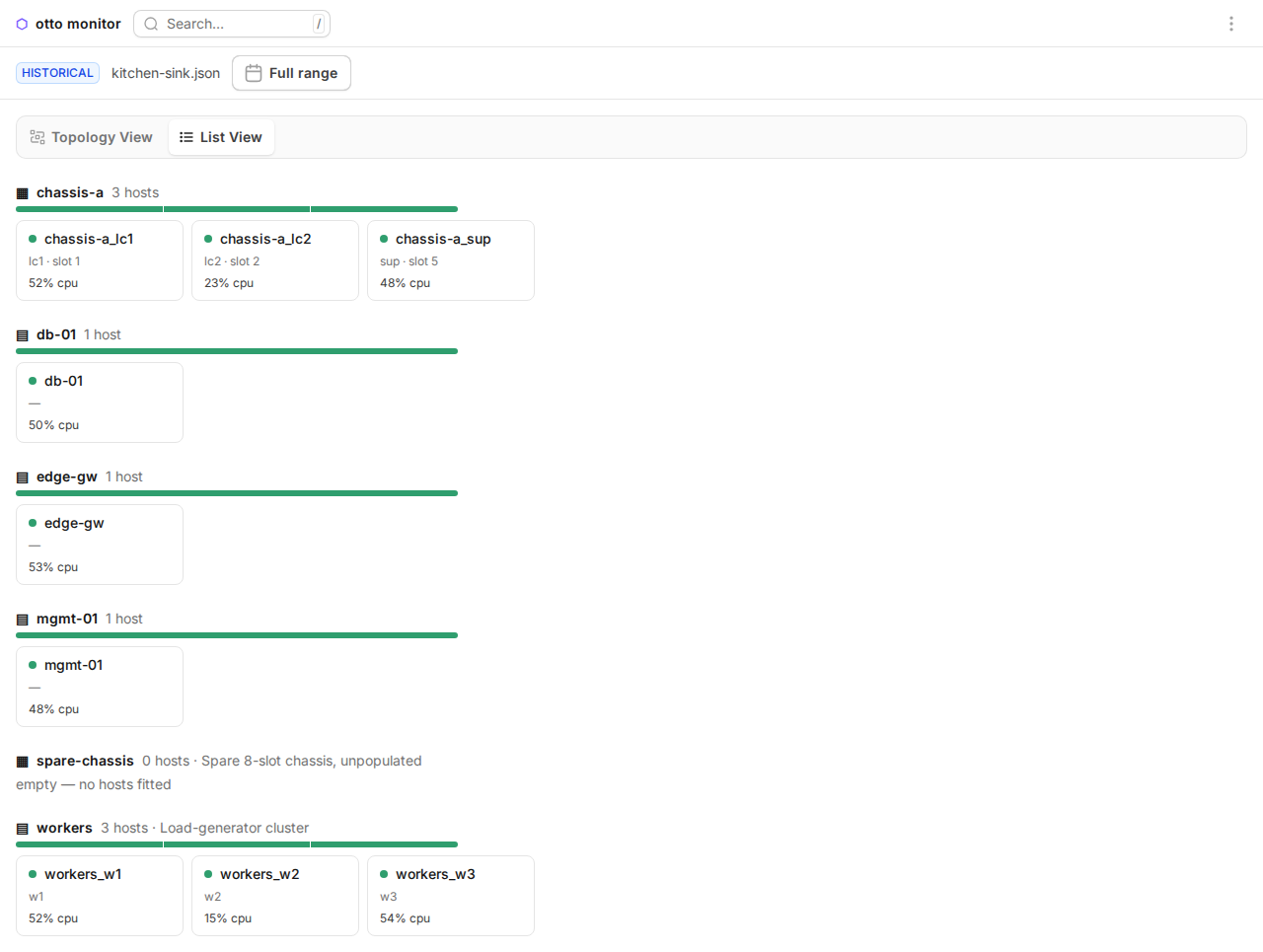
Health, scoped to the viewed range. Every status, rollup, and headline reflects whichever time window the review bar is currently showing — narrow the range and a host that’s healthy across the full session can show down (or vice versa) if that’s what the narrower window actually contains.
Per-subject charts. Drilling into a host (or an element) stacks its metrics as synced chart panels — panning or zooming one follows the rest of the stack, so a spike is easy to correlate across series. See Chart gestures below for how to drive them.
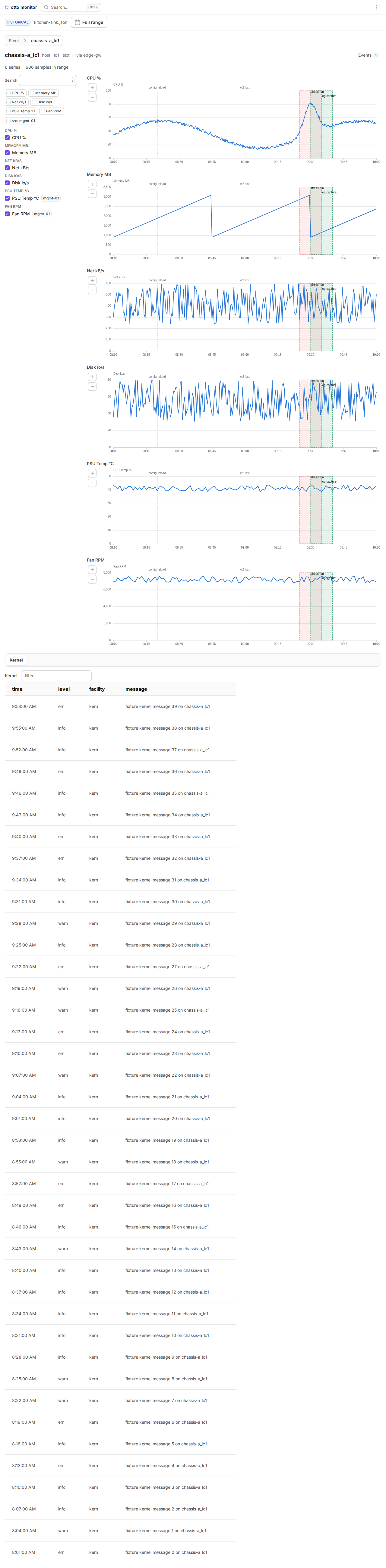
Series and source filtering. A per-subject series tree toggles individual metrics on and off; chip filters narrow by metric group or by data source (a series’ own host vs. an external management host — externally-sourced series carry a provenance badge).
Events. A reverse-chronological slide-over lists every event in the loaded document; clicking a row re-scopes the review bar’s range to that event’s span (padded ±15 minutes) — or, if that padded range falls entirely outside the session, shows a notice and stays open rather than closing on a silent no-op. An editable session (see Marking events below) adds marking controls to this same panel.
Multiple sessions. A document spanning more than one session (a config change captured mid-run, or a
--dbarchive several--live --dbruns appended into, for example) exposes a session picker; each entry’s tooltip is that session’s--label/--note, and each session renders under the lab configuration it was captured under, so drift between sessions never bleeds into the wrong one’s view.Export. The ⋯ menu re-downloads whatever document is currently loaded, unchanged.
Loading a session — automatically at boot in either mode, growing live via
SSE, or by hand via Import — is covered by the browser e2e suite
(tests/e2e/monitor/dashboard/, see the behavior-spec
contract below).
Topology view
The topology map is the dashboard’s landing view (/) — /topology remains
a working alias, so existing bookmarks and links keep resolving — with an
intra-element drill-down at /topology/<element>. It lays the lab out by its
data-plane structure rather than the management hop chain — see
Links & tunnels for the underlay/overlay model it
draws from. The inter-element map aggregates each element into one node;
opening an element expands it into its individual hosts, alongside the
local node for otto’s own management path. The fleet grid — the other
view, reachable from the same switcher — lives at /hosts; see Web
dashboard above.
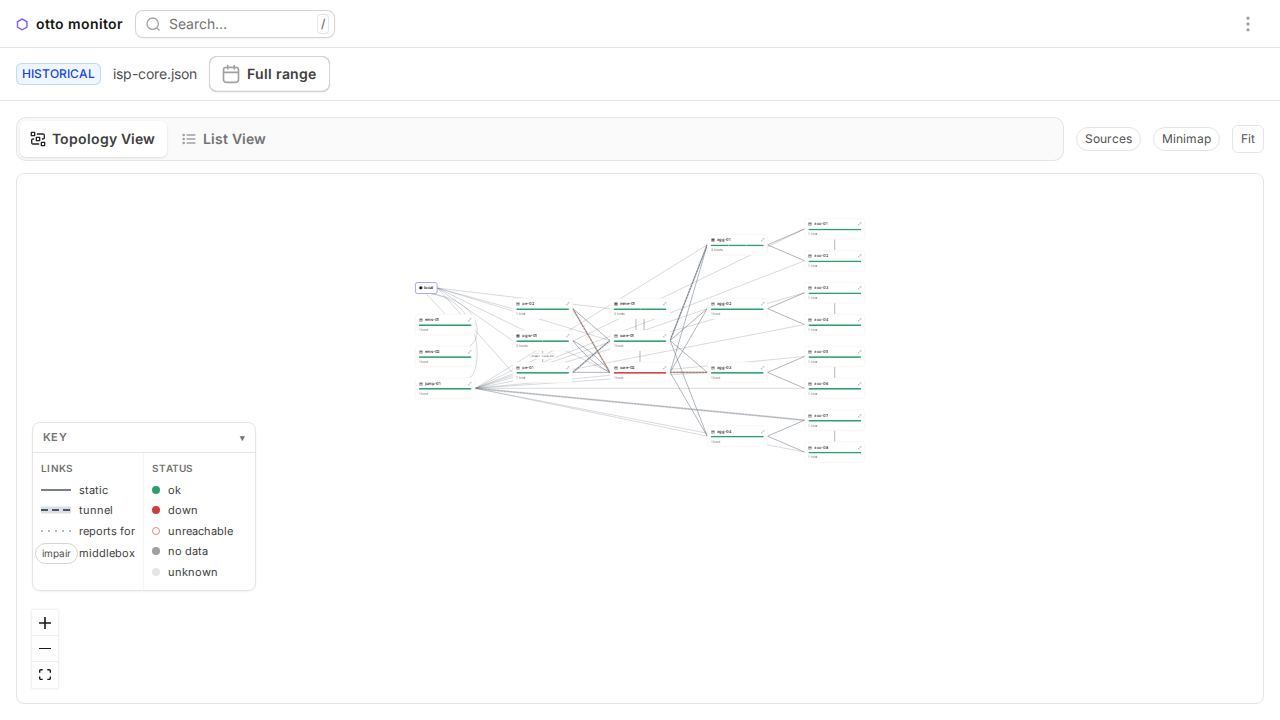
The bottom-left Key panel documents the canvas’s two axes — link class and health status — from the same style tables the canvas itself draws from, so the legend can never drift from what’s on screen. There are three link classes:
static — from the lab config: a declared link, a hop-derived one, or the
localmanagement star.tunnel — a live
otto tunnel, drawn dashed with a wide casing sleeve (the only class drawn with one) so it reads as wrapped around a path rather than as a peer of the static links.reports for — metrics sourced from a management host rather than the subject itself.
Tunnels are a live overlay, not a snapshot. Each tunnel is drawn along
the links its hop path actually traverses: a consecutive pair of hops rides
its underlay link’s exact geometry where one joins that pair, and gets a
plain routed segment between the two nodes where none does. Status styles
the whole tunnel uniformly, never per-segment — ok is the shipped
dashed-plus-casing stroke, degraded is a warning-accent variant of the
same geometry, and uncertain ghosts it down to a faint opacity. Clicking
any segment of a tunnel — riding or bare — selects the whole tunnel,
highlights every other segment of its path, and opens the tunnel block in
the link inspector: status, carriers (present/expected), protocol,
service port, age, and the ordered hop path.
Tunnel discovery runs on the collector’s own collection interval and scans the whole lab, independent of which hosts are actually monitored — a tunnel between two otherwise-unpolled hosts still appears, on the same cadence as every other metric tick.
Chart gestures
Every per-subject chart (see Per-subject charts above) shares one gesture set, synced across the whole stack the same way panning and zooming already are:
Drag across a chart’s plot area to zoom-select that range — release and the whole stack re-windows to exactly what you dragged.
Ctrl-drag pans the current window instead of zooming, keeping its width fixed. This is Ctrl on every platform, not the app’s usual per-platform modifier (⌘ on Mac, elsewhere Ctrl — see Marking events below) — ECharts’ own drag-modifier vocabulary has no meta key, so Ctrl is the one pan gesture available on every platform, and the guide follows the same choice rather than disagreeing with itself across platforms.
+/-buttons, one pair per chart, step the zoom in or out around the window’s current center — the same path a drag-select feeds, so a button click and a drag can never disagree about what “the current window” means.The mouse wheel scrolls the page, not the chart — it is never hijacked for zooming.
“Sweep span on chart” (see Marking events below) reuses the same drag gesture for a different purpose: while armed, the next drag opens the event editor pre-filled with the dragged range instead of zooming.
Marking events
Any editable session — a live run, or a review opened from a .db
session archive (see Reviewing a capture above) —
can mark events directly from the dashboard; a .json export has no
marking controls at all.
From the app bar. The Mark now… button (⌘E / Ctrl E) opens a small popover for a label and stamps a point event at the current time. Its dropdown adds:
Start span… / End span — opens the same label popover to open a span, then closes it (server clock) once you choose End span; only one span can be open at a time.
Sweep span on chart — arms a one-shot drag on the next chart you drag across: instead of zoom-selecting, that drag becomes the span’s start and end and opens the full event editor pre-filled with it. Esc cancels the armed gesture before you drag.
Add event… — opens the same editor with a blank draft, for typing exact times instead of dragging or marking “now”.
The Events slide-over carries the same flows inline, so you never have to leave it: a live session’s compose row has Mark/Start/Stop buttons; a review session (there’s no “now” to stamp against) gets a single Add event… button instead. Each row also grows Edit and End now controls once the session is editable — End now stamps an open span’s end without opening the editor. Both disappear entirely (not just disabled) on a read-only source, since there’s nothing on the server for them to persist to.
The event editor, opened from any of the flows above, has a Label,
second-granularity Start/End date-time fields (clearing End
turns a span back into a point event), a row of color swatches, and a
Dash style select (solid, dot, dash, longdash, dashdot,
longdashdot) that only affects a span’s chart overlay. Editing or
deleting an existing event reuses the same panel; deleting requires
pressing Delete twice (“Really delete?”) before it takes effect.
Live during a test run. When a test uses start_monitor() (see
Monitoring from test suites below), both
the automatic per-test start/pass/fail marks and any add_monitor_event
call appear on that run’s open dashboard the moment they’re recorded —
the same live /api/stream feed the metrics ride — so there’s no reload
needed to watch a test’s marks land while it runs.
Live status, pause, and reconnect
While --live, a healthy session shows no connection chrome at all — the
app bar stays quiet as long as the stream is open and receiving fragments.
If the SSE connection drops, a slim amber Reconnecting… banner appears
directly under the app bar for as long as the retry-with-backoff loop is
unresolved, and disappears the moment the stream reconnects. Pause/Resume
is the icon button in the app bar’s right-hand cluster (its aria-label
reads “Pause” or “Resume” to match); review/historical context — including a
client-side Import with no backing server — is carried entirely by the
review bar’s HISTORICAL badge, never by the app bar.
Pause is a view control, not a data control. Clicking Pause freezes the visible time window; it does not stop ingestion — fragments keep applying to the loaded session in the background, so clicking Resume catches up immediately with no gap to backfill. “Paused” is derived rather than a separately stored flag: it is exactly “live mode with a pinned range,” so pausing and manually picking a custom range (a chart drag-zoom, for example) are the same state and can never disagree with each other — toggling pause from either one resumes following the tail.
Reconnect re-fetches; it never replays. When the SSE connection drops,
the client backs off and retries, and immediately before reopening the
stream it re-fetches the whole /api/monitor_sessions payload rather than
trying to replay whatever fragments it missed while disconnected — the
fresh snapshot is already the truth, so there’s no sequence-number
bookkeeping and no way for client and server to disagree about history.
A silent host dims. Health (see Health, scoped to the viewed
range above) is derived from the gap since a host’s last
sample: a host goes down once that gap exceeds HEALTH_K (3) times its
collection cadence. In live mode that evaluation runs against a moving
“now” rather than a fixed range boundary, driven by a clock that ticks at
the collection interval — polling the health check faster than the
collector itself couldn’t learn anything sooner anyway.
Frontend development
The dashboard’s frontend is a React + Vite + TypeScript single-page app in
web/. Vite builds it into src/otto/monitor/static/dist/, the only
frontend MonitorServer serves — there is no
legacy fallback, so a checkout without a build fails loudly with a
make web pointer rather than silently serving something stale.
make web-install   # npm ci, from web/package-lock.json
make web-dev       # Vite dev server with hot reload; proxies /api to a
                    # running `otto monitor` (default http://127.0.0.1:8080,
                    # override with VITE_OTTO_TARGET=http://host:port)
make web           # production build: regenerates + diffs the generated
                    # wire types against the live pydantic models, builds,
                    # then gates the output against absolute http(s) URLs
                    # (labs are air-gapped)
make test-ts       # vitest — store reducers, SSE handling, chart-series
                    # grouping, per-chart series capping, etc.
make web-dev’s proxy target is a running server process — an otto monitor --live collector or an otto monitor <source> review server both
serve /api/* — useful for developing against real backend responses,
live or historical. make web is what actually ships in the wheel.
Behavior-spec contract. tests/e2e/monitor/dashboard/ is a Playwright
suite that pins the dashboard’s observable surface through data-testid
attributes only — styling and DOM structure are free to change underneath
them. Those pins adjudicate, not this page or the source: if a doc
description and a pin ever disagree, fix the doc. Run them locally with
make dashboard (Chromium only — the fast
per-task check; needs make browsers once) or make dashboard-all for the
full cross-engine matrix: Chromium (Blink), Firefox (Gecko), and WebKit
(Safari). The one Safari-specific test runs on WebKit only via
@only_browser("webkit"). make release runs all three; CI runs them as a
parallel per-engine matrix.
Securing the dashboard
otto monitor binds 0.0.0.0 on purpose — LAN viewing is the point — so
every run is protected by a per-run access key, with optional TLS layered on
top when a lab needs it.
Access key
Every otto monitor run generates a fresh access key and folds it into the
printed URLs as ?key=…, so the console output you copy-paste is already
self-authenticating. Opening one of those keyed URLs once sets a browser
cookie for the rest of the run — every later request from that browser,
including the SSE stream and every /api/* call, rides the cookie and never
needs the query parameter again. Opening the bare address, with no key and
no cookie, renders a small 403 hint page pointing back at the full URL
otto monitor printed.
There are no flags to disable or pin the key — no --key, no --no-key.
The key is always freshly generated and always required.
Enabling TLS
TLS is optional and config-driven, never a CLI flag. Add a [monitor]
table to .otto/settings.toml:
[monitor]
tls_cert = "~/.config/otto/tls/monitor-cert.pem"
tls_key  = "~/.config/otto/tls/monitor-key.pem"   # omit if the cert PEM bundles the key
settings.toml is committed and shared by the whole team, so tls_cert /
tls_key point at a conventional per-user path (~ is expanded) rather
than a path that only exists on one machine — see Who creates which
certificate below for why the certificate
itself still lives per-machine, never in the repo.
TLS configured but broken — a missing or unreadable cert/key file — exits 1
naming the path and the settings key; it never falls back to plain HTTP
silently, since a security downgrade must not be quiet. With more than one
repo listed in OTTO_SUT_DIRS, disagreeing [monitor] tables across those
repos are a hard error naming both; identical or single declarations just
apply.
Who creates which certificate
TLS needs three artifacts, and each one has a different owner and scope:
Artifact |
Scope |
Lives where |
Committed? |
|---|---|---|---|
CA certificate + CA key |
Team-wide, created once by a team owner |
CA key: restricted (owner’s machine or secrets store). CA cert: distributed freely |
CA cert may be committed (it’s public); CA key never |
Server (leaf) cert + key |
Per-machine — one per machine that runs |
|
Never |
|
Per-repo, committed, shared by the team |
|
Yes — which is why it points at the conventional |
Why not the other scopes:
Per-repo cert. A repo is cloned onto many machines with different IPs; one leaf cert cannot cover them all, and committing a private key is disqualifying on its own.
Per-user self-signed (no CA). Every viewer gets a browser interstitial per origin, and the port is ephemeral, so the warning returns on every run. Adding a new monitor machine means re-distributing trust to every viewer. With a CA, viewers trust once and every future leaf cert is covered.
Creating the certificates
Step 1 — team owner creates the CA (once per team). Keep
otto-lab-ca.key restricted; distribute otto-lab-ca.crt to everyone.
openssl req -x509 -newkey rsa:4096 -sha256 -days 1825 -nodes \
  -keyout otto-lab-ca.key -out otto-lab-ca.crt \
  -subj "/CN=Otto Lab CA"
Step 2 — each viewer trusts the CA (once per viewing machine).
Linux:
sudo cp otto-lab-ca.crt /usr/local/share/ca-certificates/ && sudo update-ca-certificatesmacOS: import into Keychain Access → System, set “Always Trust” (or
security add-trusted-cert -d -k /Library/Keychains/System.keychain otto-lab-ca.crt)Windows:
certutil -addstore Root otto-lab-ca.crtFirefox keeps its own store: Settings → Certificates → Import, or set
security.enterprise_roots.enabled.
Step 3 — each monitor machine gets a leaf cert (per machine, by its
user). The SAN list must cover every address the server prints — i.e.
every non-loopback interface IP (otto monitor prints one URL per
interface) plus any DNS name teammates use.
openssl req -newkey rsa:2048 -sha256 -nodes \
  -keyout monitor-key.pem -out monitor.csr -subj "/CN=$(hostname)"

openssl x509 -req -in monitor.csr -sha256 -days 825 \
  -CA otto-lab-ca.crt -CAkey otto-lab-ca.key -CAcreateserial \
  -out monitor-cert.pem \
  -extfile <(printf 'subjectAltName=IP:10.10.200.5,IP:192.168.1.20,DNS:%s' "$(hostname)")
(825 days is the maximum validity Apple platforms accept; longer and Safari rejects the cert outright.)
Step 4 — install where settings.toml points.
mkdir -p ~/.config/otto/tls
mv monitor-cert.pem monitor-key.pem ~/.config/otto/tls/
chmod 600 ~/.config/otto/tls/monitor-key.pem
A machine whose interface IPs change (DHCP without reservation) needs its leaf cert regenerated with the new SANs — the error surfaces as a browser trust warning naming the SAN mismatch. Static lab addressing avoids this.
Monitoring during a test run
Pass --monitor to otto test to collect metrics for the entire run.
Per-test start/end events are emitted automatically and the captured
data is written to <output_dir>/monitor.json at exit:
otto --lab my_lab test --monitor TestPerformance
otto --lab my_lab test --monitor --monitor-interval 2 --monitor-hosts router TestPerformance
otto --lab my_lab test --monitor --monitor-output run.db TestPerformance
otto monitor <path> opens either output in the same review dashboard
described in Reviewing a capture above — the
document loads automatically the moment the page opens, no Import click
needed.
Monitoring from test suites
You can also start the monitor programmatically from within a single test:
class TestPerformance(OttoSuite[_Options]):

    async def test_load(self, suite_options: _Options) -> None:
        await self.start_monitor(hosts=[host1, host2])
        await self.add_monitor_event("Load started", color="#2ca02c")

        # ... run workload ...

        await self.add_monitor_event("Load complete", color="#d62728")
        await self.stop_monitor()
add_monitor_event validates through the same seam every other marking
surface uses (see Marking events below): label can’t
be blank, color must be a #rrggbb hex string (not a CSS color name),
and dash must be one of the six styles the event editor offers — a
violation raises a validation error immediately, before the collector is
ever touched.
When both per-suite and --monitor-driven session collectors are active,
the per-suite collector takes precedence for that test. Events — the
automatic per-test start/pass/fail marks and any add_monitor_event call
— appear live on the dashboard timeline the moment they’re recorded, making
it easy to correlate metric changes with test actions; see Marking
events for what the dashboard does with a mark once it’s
there.
Built-in metrics
Every Unix host in the monitored set runs DEFAULT_PARSERS unless a custom
registration says otherwise (see Custom parsers below).
Each chart draws at most MetricParser.max_series series at once — 8 by
default — beyond which the dashboard shows the first max_series and notes
how many were hidden; a parser can raise that cap or set max_series = None
to opt out entirely, as the CPU chart below does:
Command |
Series |
Chart |
Tab |
Notes |
|---|---|---|---|---|
|
Overall CPU; |
CPU |
CPU |
One read yields both: the aggregate |
|
Memory Usage; Swap |
Memory Usage |
Memory |
The Swap series only appears when the host has swap configured — it is omitted, not charted as a flat 0. |
|
one series per mounted filesystem, labelled by mount point |
Disk Usage |
Disk |
|
|
Load (1m), Load (5m), Load (15m) |
Load |
CPU |
|
|
|
Network I/O |
Network |
Loopback ( |
|
Established, Time-wait |
Sockets |
Network |
A host without |
|
|
Disk I/O |
Disk |
Whole devices only — partitions ( |
|
Runnable, Total procs, Blocked |
Processes |
CPU |
Network I/O and Disk I/O are rate metrics: computed from monotonic counter deltas, they need two samples before they can chart anything, so the first tick for a given interface or device emits no point. A host reboot resets those counters; otto detects the resulting negative delta, skips one tick, and re-baselines from the new counters — a reboot never shows up as a spike.
Note
otto tunnel discovery (discover_tunnels) is built as a
(command, pure parser) pair for exactly this reason — it maps 1:1 onto the
MetricParser shape below (command / parse / interval). otto tunnel needs
no monitor to function — otto tunnel list is the CLI’s own live view. When
otto monitor is running, the collector also scans the whole lab for
tunnels on each collection interval and streams them into the topology view
as overlays; see Topology view above.
Custom parsers
The monitor uses parsers to extract metrics from command output. By default,
all hosts use DEFAULT_PARSERS. Subclass MetricParser and implement
parse(self, output, *, ctx) to extract one or more data points from a
command’s raw output, then register it for specific hosts:
from otto.monitor.collector import MonitorTarget
from otto.monitor.parsers import DEFAULT_PARSERS, MetricDataPoint, MetricParser, ParseContext


class NvidiaGpuParser(MetricParser):
    y_title = "Usage %"
    unit = "%"
    chart = "GPU"
    command = "nvidia-smi --query-gpu=utilization.gpu --format=csv,noheader,nounits"

    def parse(self, output: str, *, ctx: ParseContext) -> dict[str, MetricDataPoint]:
        return {self.chart: MetricDataPoint(value=float(output.strip()))}


MonitorTarget(
    host=gpu_host,
    parsers={
        **DEFAULT_PARSERS,
        NvidiaGpuParser.command: NvidiaGpuParser(),
    },
)
ctx (a ParseContext) carries tick-local
input such as the current collection timestamp; most parsers ignore it. See
otto.monitor.parsers for the built-in parsers and the
MetricParser protocol.
Per-host parsers
Register a custom parser dict for one host — or a family of hosts matched by
a compiled regex — from an init module listed in .otto/settings.toml.
Registration matches on the host id (the unique key, as in lab.hosts),
not the human-readable display name shown in the dashboard:
from otto.examples.monitor import UptimeParser
from otto.monitor.parsers import DEFAULT_PARSERS, register_host_parsers

register_host_parsers(
    "router1",
    {**DEFAULT_PARSERS, UptimeParser().command: UptimeParser()},
)
UptimeParser (in otto.examples.monitor) is a complete, runnable example:
it charts cat /proc/uptime as a single “Uptime” series in seconds, and
otto’s own test suite registers it exactly this way.
A compiled pattern instead of a host id scopes the same registration to
every host whose id matches — for example, giving a family of busybox-*
hosts (whose ss doesn’t support -s) a netstat-based sockets parser in
place of the default ss -s one:
import re

from otto.monitor.parsers import DEFAULT_PARSERS, register_host_parsers
from my_repo.parsers import NetstatSocketsParser  # your own ss-free implementation

parsers = {k: v for k, v in DEFAULT_PARSERS.items() if k != "ss -s"}
parsers[NetstatSocketsParser.command] = NetstatSocketsParser()
register_host_parsers(re.compile(r"busybox-.*"), parsers)
Patterns are matched with re.fullmatch against the host id. Precedence is
exact id > pattern > project-level > DEFAULT_PARSERS: an exact-id
registration always wins outright for that host, and a host matched by two
different patterns raises at resolution time rather than picking a silent,
import-order-dependent winner.
Project-level parsers
Register parsers that apply to every monitored host from an init module
(listed in .otto/settings.toml):
from otto.monitor.parsers import register_parsers
from my_repo.parsers import SocketParser

register_parsers([SocketParser()])
A parser whose command matches a built-in overrides it; new commands
extend the set. Per-host registrations (register_host_parsers) still take
total precedence for their host. Registering the same command twice raises.
Per-parser collection intervals
Set interval (seconds) on a parser class to poll its command on its own
cadence; parsers without one use the global --interval:
class SocketParser(MetricParser):
    command = "ss -s"
    interval = 30.0  # poll sockets every 30s regardless of --interval
    ...
Parser health
The collector watches each parser’s command for two kinds of trouble and logs a warning — edge-triggered, so a flapping command logs every transition while a steady outage logs only once.
Failing command. The first tick a command starts failing (nonzero exit) logs a warning naming the metrics that will be missing; recovery logs once more when the command starts succeeding again:
Monitor: 'ss -s' failed on test1 (exit 127): ss: command not found — Sockets metrics will be missing
Monitor: 'ss -s' recovered on test1 after 4 failed tick(s)
Silent command. A command that keeps exiting 0 but never yields a data point — a bad regex, an unfamiliar output format, nothing to report — gets a one-time backstop warning after three succeeding ticks with no output:
Monitor: parser SocketsParser ('ss -s') has produced no data on test1 after 3 ticks
Only succeeding ticks count toward those three; a failing command is already covered by the warning above and isn’t double-counted here. The same backstop watches SNMP OIDs that never return a value.
Either way, a missing tool or unreachable metric is not an error otto tries to recover from: the affected series is simply absent from the dashboard, same as any other tick that produced no data.
Log-sourced data
Some systems don’t expose live values through a poll-able command: a cron
job digests performance counters into a timestamped file every few
minutes, or the interesting record is a log file’s event stream rather
than a number. Both ride the same shell acquisition path as every other
parser — the command is the reduction step (cat/tail/awk/grep/jq
on the host ships back only the lines otto needs) — but instead of one
untimed value per tick, each row or line carries its own timestamp. The
design assumes source data is textually reducible on the host; binary or
otherwise irreducible formats are out of scope.
CSV metric files
CsvMetricParser charts a cron-digested
CSV file. Register it like any other parser (see Custom parsers):
from otto.monitor.log_sourced import CsvMetricParser
from otto.monitor.parsers import register_parsers

register_parsers([
    CsvMetricParser(
        "cat /var/log/perf/net.csv",
        columns=["rx_kbps", "tx_kbps"],
        chart="Cron net digest",
        tab="network",
        tab_label="Network",
        unit="kb/s",
        interval=60,
    ),
])
Line format: the first column is an ISO-8601 or epoch-seconds timestamp
(naive values are treated as UTC); the remaining columns are numeric
values matching columns, comma-separated, in file order. Header and
otherwise malformed lines are skipped outright. The final line of each
read is provisional rather than trusted immediately — a mid-write read
can torn-truncate it into something that still parses — so it only emits
once a later read shows it unchanged; worst case this delays the newest
row by one poll interval, and a torn line itself never emits (see
Timestamps below for the high-water mark this protects).
Because points carry their own data-carried timestamps rather than the collector’s tick time, a file already holding the last hour of digests backfills the dashboard and DB with a full hour of real history the moment monitor starts, not just whatever arrives after that.
One instance per file: the command string is the parser registry key, so
monitoring “a couple of CSV files” means two registered instances. Give a
slow-cadence file its own interval (seconds; see
Per-parser collection intervals) so
otto doesn’t re-read an unchanged file on every tick.
A cron job maintaining such a file might look like this:
#!/bin/sh
# Example cron digest: append "epoch,val1,val2", prune to the last hour.
# Cron entry (every 5 minutes):  */5 * * * *  root  /usr/local/bin/perf_digest.sh
FILE=/var/log/perf/net.csv
printf '%s,%s,%s\n' "$(date -u +%s)" "$(cat /sys/class/net/eth0/statistics/rx_bytes)" \
    "$(cat /sys/class/net/eth0/statistics/tx_bytes)" >> "$FILE"
tail -n 12 "$FILE" > "$FILE.tmp" && mv "$FILE.tmp" "$FILE"   # 12 lines = 1 h at 5-min cadence
Provisioning a script like this on a bed is a manual demo step — otto’s own
test suite exercises CsvMetricParser entirely against fixture-written
files, never a live cron job.
Log-event tables
RegexLogEventParser turns matching log
lines into table rows instead of chart points. A worked syslog example,
using the same pattern otto’s own test suite registers:
from otto.monitor.log_sourced import RegexLogEventParser
from otto.monitor.parsers import register_parsers

SYSLOG_PATTERN = r"^(?P<ts>\S+) (?P<loghost>\S+) (?P<proc>[^:\[]+)(?:\[\d+\])?: (?P<message>.*)$"

register_parsers([
    RegexLogEventParser(
        "tail -n 200 /var/log/syslog",
        SYSLOG_PATTERN,
        tab="syslog",
        tab_label="Syslog",
    ),
])
Every named group in pattern besides the timestamp group becomes a table
column, in pattern order (loghost, proc, message above). A line that
doesn’t match is skipped entirely — a wrong pattern therefore produces zero
rows ever, which the Parser health silent-command
backstop surfaces by the third tick.
ts_group (default "ts") names the group holding the timestamp;
ts_format (default "iso") tells parse_timestamp how to read it:
"iso" for ISO-8601, "epoch" for Unix epoch seconds, or anything else as
a strptime format. Classic syslog timestamps (Jan 2 15:04:05, no year)
need a strptime format — otto injects the current UTC year before
parsing those, so they parse correctly instead of rejecting outright. If
that injected year would land the row more than 2 days in the future (a
Dec 31 line read just after New Year rolls over to next year’s Jan 1
under the current-year injection), otto subtracts one year — the standard
syslog-consumer rollover guard, so a New Year boundary can’t wedge the
high-water mark a year ahead of every real row.
Each RegexLogEventParser contributes one kind="table" tab on the
dashboard and no chart. Rows render newest-first with a client-side,
case-insensitive substring filter; the browser keeps roughly the last 500
rows on screen even though the database keeps every row ever collected —
reload that database with otto monitor <path> (see Reviewing a
capture) and the full history replays as a table
too, not just as charts.
Table parsers must declare their own tab id: a table tab can’t share an
id with a chart tab, or with another table tab (see
TabSpec). Registering a colliding tab id is a
configuration error that otto raises loudly rather than silently picking a
winner.
LogEvent rows are a deliberately separate
data path from MonitorEvent markers: log
events are per-host, high-volume, columnar table data, while
MonitorEvents are the global, low-volume annotations that mark moments
on the chart timeline (see
Monitoring from test suites).
Timestamps
Every log-sourced row carries its own data-carried timestamp instead of the collector’s tick time; a naive value (no timezone) is always treated as UTC, whether it comes from a CSV’s first column or a regex’s timestamp group. A row with no parseable timestamp is dropped — log-sourced parsers have no tick-time fallback, so an empty or unrecognized timestamp field means that row never appears at all.
Each parser instance keeps a high-water mark: the newest row timestamp it
has emitted so far. Re-reading a rolling window (the usual tail -n N)
drops everything at or below the mark, so ticks that overlap the previous
read are deduplicated rather than double-counted. The mark is keyed on the
row’s own timestamp, not a file offset or byte count, so log rotation and
truncation need no special handling — a rotated file’s new rows are still
newer than the mark and come straight through.
Large files
An append-only log fits at any size: a fixed tail -n N window bounds
what one tick reads, and the high-water mark discards whatever overlaps
the previous read, so N only needs to comfortably cover one poll
interval’s worth of new lines, not the file’s total size.
Because a parser’s command string is a static registry key, one parser
can’t vary its command per tick — reading from a byte offset that grows
over time, for example, is unsupported by design; size tail -n N to the
interval instead. A large regenerated file (a digest script that
rewrites the whole thing on every run rather than appending) fits the same
way any verbose command output does: reduce at the source with
awk/jq/a product CLI, and give the parser its own slower interval
(see Per-parser collection intervals)
if the file itself only changes infrequently — each parser rides its own
bucket, so a slow file never blocks faster ones.
SNMP monitoring
Some targets expose performance metrics over SNMP rather than via a shell interface. Otto supports SNMP v2c polling for any standards-compliant agent — a Zephyr device running otto’s test-bed agent, a Linux box running net-snmp, or network gear — on a separate channel from command execution.
When to use it
Use SNMP monitoring when a host either has no shell (embedded Zephyr targets) or
when you prefer to pull metrics through a dedicated management channel rather than
shell commands. See Embedded Hosts for embedded host setup and Lab Configuration
for the snmp field reference.
Configuring the snmp block in lab.json
Add an snmp object to a host entry in lab.json to enable SNMP collection
for that host:
{
    "ip": "192.0.2.1",
    "element": "sprout",
    "os_type": "zephyr",
    "snmp": {
        "address": "10.10.200.14",
        "port": 16101,
        "community": "public",
        "oids": [
            "1.3.6.1.2.1.1.3.0",
            "1.3.6.1.4.1.63245.1.1.0",
            "1.3.6.1.4.1.63245.1.2.0",
            "1.3.6.1.4.1.63245.1.3.0",
            "1.3.6.1.4.1.63245.1.4.0"
        ]
    }
}
The address and port are the endpoint reachable from the otto host — for
an embedded device behind a hop this is typically the local end of a UDP relay
on the hop host, not the device’s own address. community defaults to
"public". oids is the list of OIDs to poll each tick — raw dotted OIDs,
otto’s named bundles (otto-core, otto-net:N, otto-fs:N), or a mix of
both; see the snmp.oids field reference in Lab Configuration for the full
bundle syntax. Presentation (label, chart group, unit) is supplied by the
descriptor registry, not by lab data.
How otto reads SNMP data
SnmpClient (in otto.monitor.snmp) is a thin async SNMP v2c GET wrapper. It
issues a single GET PDU per poll tick for all configured OIDs and returns a
{oid: float | None} mapping. The pysnmp library is imported lazily inside
SnmpClient.get, so the SNMP path is entirely optional — otto imports cleanly
without pysnmp installed, and unit tests can mock at the get boundary.
Built-in metric descriptors
Otto ships descriptors for a standard OID set. Each descriptor (an SnmpMetric)
carries the label, chart group, y-axis title, unit, tab, and a scale factor
that converts the raw integer varbind to a real value.
OID |
Label |
Chart |
Unit |
Notes |
|---|---|---|---|---|
|
Uptime |
Uptime |
s |
Standard |
|
Overall CPU |
CPU |
% |
Otto enterprise OID (centi-percent ÷ 100) |
|
Heap Used |
Memory Usage |
B |
Otto enterprise OID |
|
Heap Free |
Memory Usage |
B |
Otto enterprise OID |
|
Threads |
Threads |
— |
Otto enterprise OID |
The enterprise OIDs are served by otto’s Zephyr test-bed agent. The enterprise
base is 1.3.6.1.4.1.63245 (PEN 63245, a placeholder — a real IANA PEN has not
yet been assigned).
kind governs how a raw varbind becomes a chart point: gauge (the
default, e.g. Heap Used above) charts raw * scale directly; counter
treats the varbind as a monotonic counter and converts it to a per-second
rate — first sighting and post-reboot re-baselining emit nothing, the same
rule the Unix Network I/O/Disk I/O parsers follow (see
Built-in metrics).
Per-interface and per-filesystem OIDs
Network and filesystem metrics live in an indexed subtree rather than a
handful of fixed leaves: a small agent has a known, fixed set of interfaces
and filesystems, 0-indexed by the firmware, and otto polls one scalar per
value with a plain GET — no table walk. This layout is the
firmware/manager contract: the agent and otto must agree on it exactly,
the same way both sides agree on the core .1 scalars above.
OID |
Leaf |
Kind |
Notes |
|---|---|---|---|
|
rx bytes |
counter |
Charted as |
|
tx bytes |
counter |
Charted as |
|
rx packets |
counter |
Rides the rx-bytes series’ hover meta, not its own chart. |
|
tx packets |
counter |
Rides the tx-bytes series’ hover meta. |
|
rx+tx errors (combined) |
counter |
Charted as |
|
drops |
counter |
Charted as |
|
filesystem used bytes |
gauge |
Charted as |
|
filesystem total bytes |
gauge |
Rides the used-bytes series’ hover meta as a human-readable total, not its own chart. |
<i> is the interface or filesystem index (0, 1, …). The generated
labels above (rx if0, fs1 used, …) come from the same descriptor
registry as the core scalars, so they can be renamed per device — see
Extending: registering custom descriptors
below. Lab data never spells out these OIDs directly; the otto-net:N /
otto-fs:N bundles (see Lab Configuration) expand them and register their
descriptors together.
An OID present in oids but without a registered descriptor falls back to
default styling via resolve_snmp_metric: the OID string is used as the label
and chart name on the generic metrics tab, so a host can poll a bare OID with
zero code and still get a chart.
Extending: registering custom descriptors
Register a descriptor for a private or device-specific OID from an init module
listed in .otto/settings.toml:
from otto.monitor.snmp import SnmpMetric, register_snmp_metric

register_snmp_metric(
    SnmpMetric(
        oid='1.3.6.1.4.1.99999.1.5.0',
        label='Fan Speed',
        chart='Fan',
        y_title='RPM',
        unit='rpm',
        tab='fans',
        tab_label='Fans',
        scale=1.0,
    )
)
This follows the same extension pattern as register_host_parsers and
register_command_frame. The SnmpMetric fields are oid, label,
chart, y_title, unit, tab, tab_label, and scale; everything
after chart has a default, so a private OID only needs the first three:
>>> from otto.monitor.snmp import SnmpMetric
>>> m = SnmpMetric(oid='1.3.6.1.4.1.99999.1.5.0', label='Fan Speed', chart='Fan',
...                y_title='RPM', unit='rpm', tab='fans', tab_label='Fans')
>>> m.tab, m.tab_label, m.scale
('fans', 'Fans', 1.0)
>>> SnmpMetric(oid='1.2.3', label='X', chart='C').tab
'metrics'
register_snmp_metric always overwrites, so the same call renames a
built-in descriptor too — including the auto-generated per-index labels
from Per-interface and per-filesystem OIDs
(rx if0, fs1 used, …): register a new SnmpMetric for that exact OID
with a more meaningful label (e.g. rx wan0) and it replaces the default.